TABLE OF CONTENTS
- What are Identification Tips?
- How to find the Identifications Tips Tab
- How to nominate an identification remark
- How to nominate your own identification remark before posting it
- What makes a good identification tip, and how can I vote on one?
- The Identification Tips Tab: A Detailed Look
What are Identification Tips?
Identification Tips are helpful identification remarks (i.e. text written along with an Identification) which have been nominated and voted on by the iNaturalist community. The Identification Tips tab on species’ taxon pages makes it easier to find, share, nominate, and upvote tips that help people identify species — all in one place. Note that these currently appear only on species or subspecies level identification remarks.
How to find the Identifications Tips Tab
Navigate to any species or subspecies page (e.g. Passiflora incarnata). You'll see an "Identification Tips" tab:
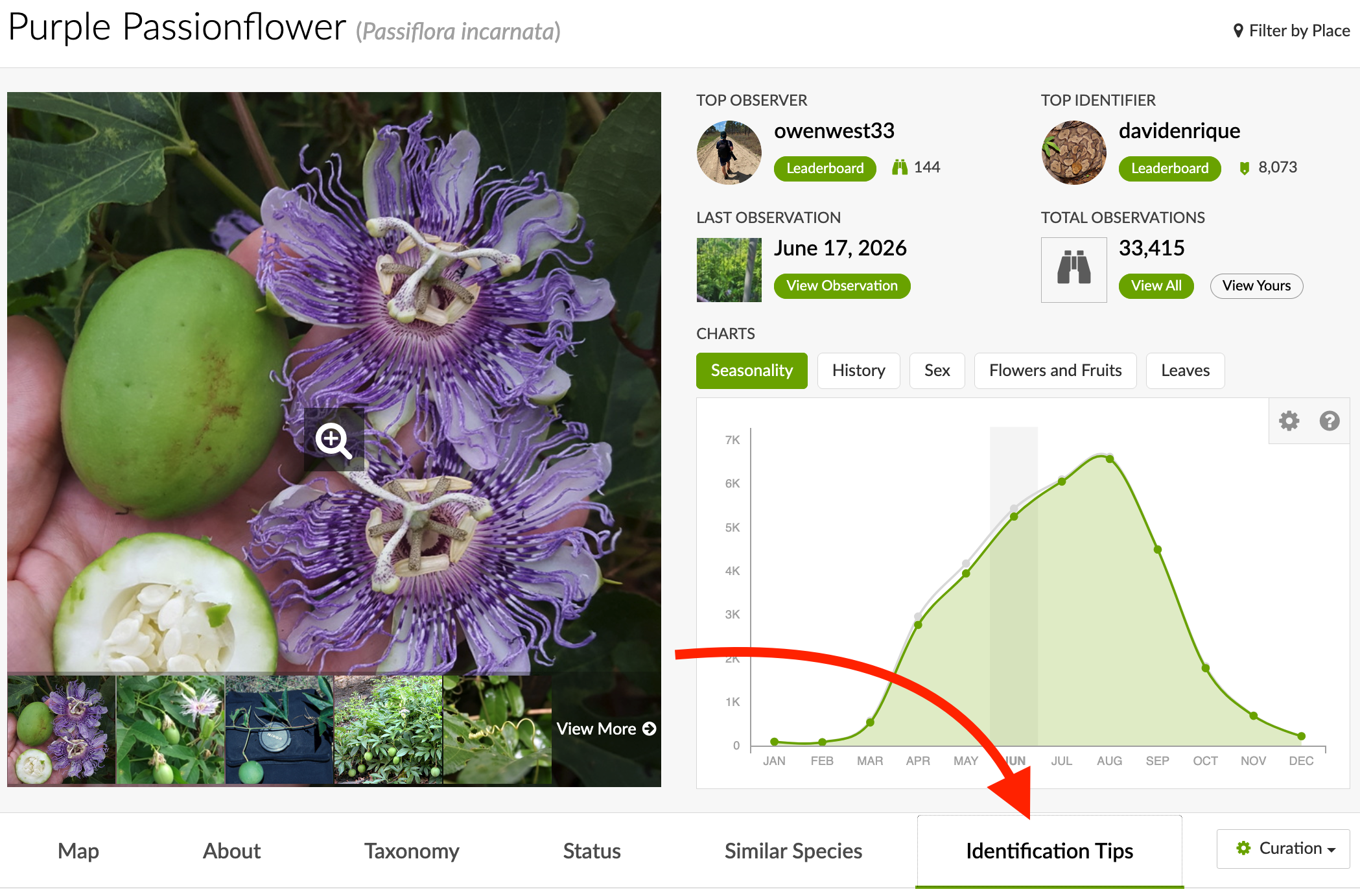
- Browse nominated ID tips for that species
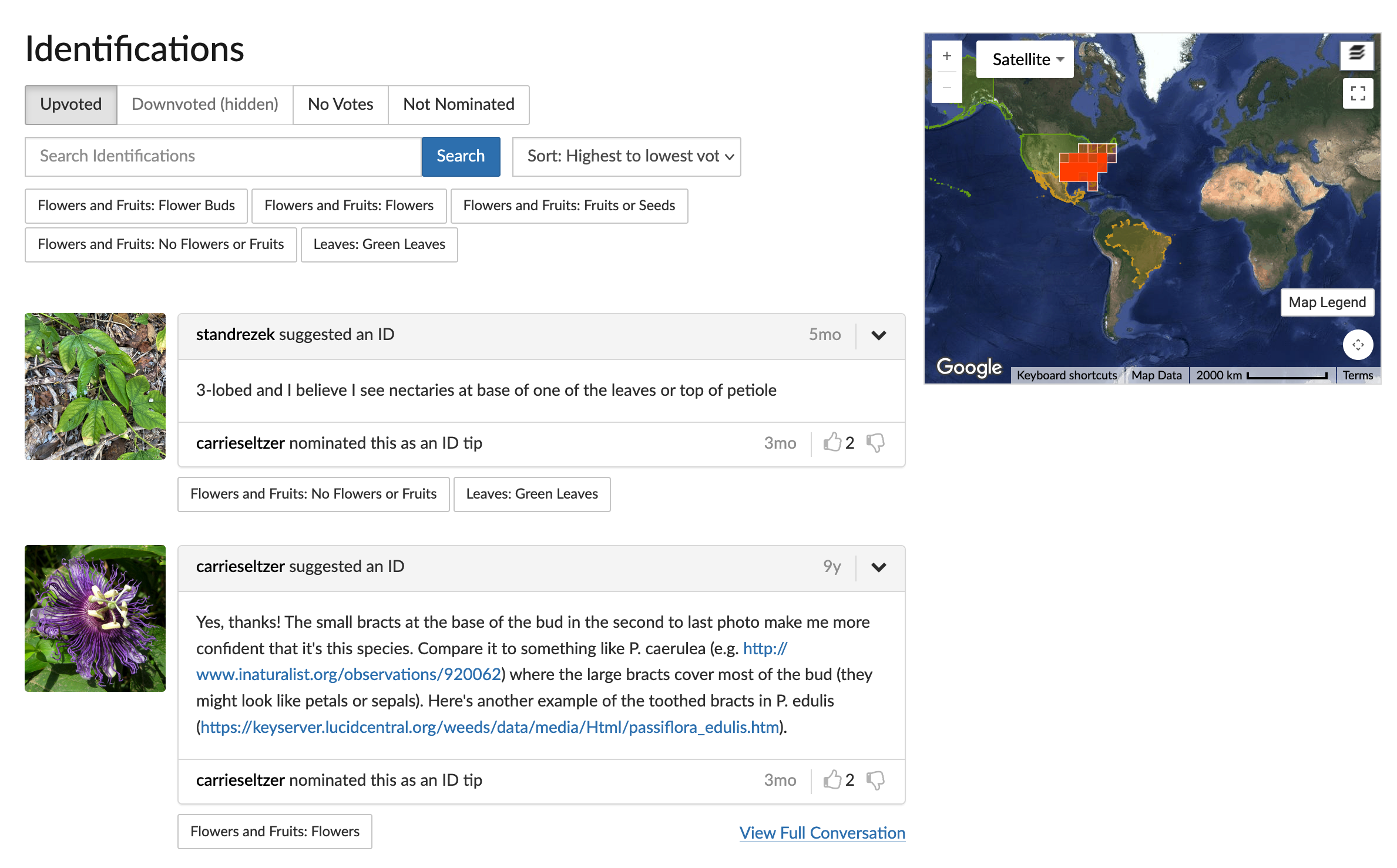
- Upvote or downvote tips based on how helpful they are
- Find and Nominate an existing remark as a Helpful ID Tip
- View the Full Conversation to see the Tip in context
How to nominate an identification remark
If your account is 30 days old, you have a confirmed email address, and you have made either 50 verifiable observations or 100 identifications for other users, you can nominate or vote on an identification tip.
When you spot a helpful identification remark while browsing or identifying observations:
- Click the chevron symbol next to the remark and select "Nominate" to nominate it as an identification tip.
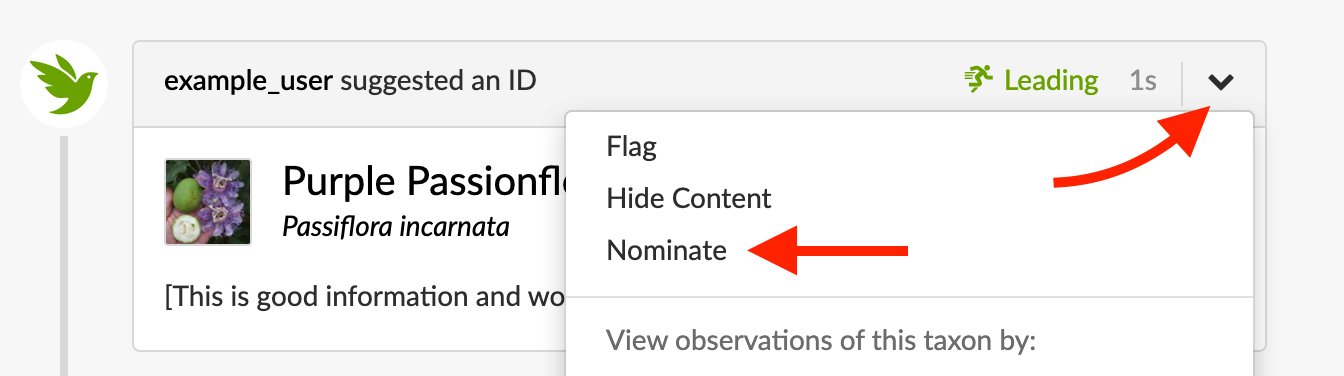
- You and anyone else can then vote on the tip and it will appear on the taxon's Identifications tab.
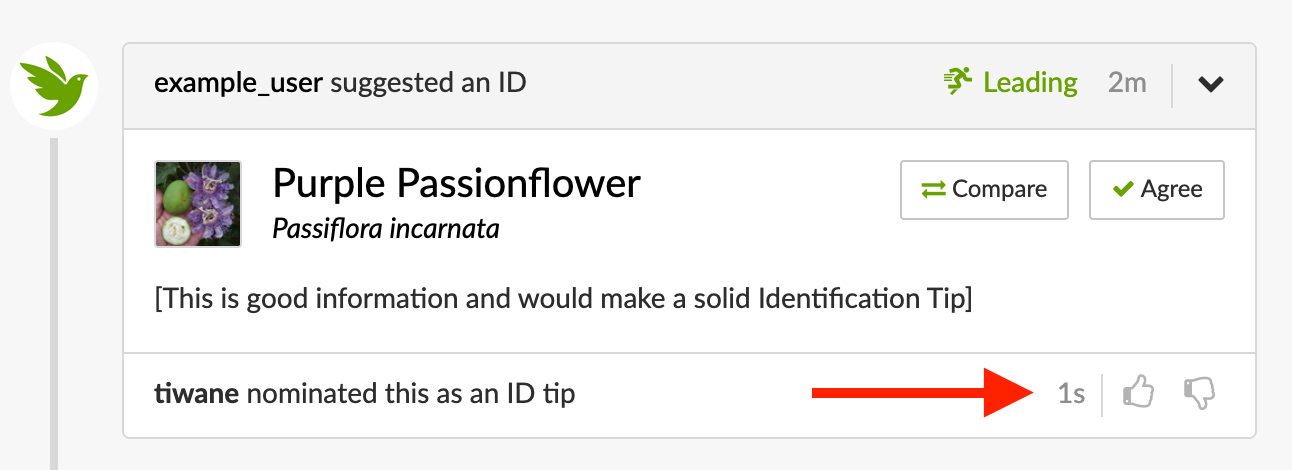
For any identification tip you have already nominated, or if you posted the nominated identification remark, you'll see a "Remove Nomination" option instead. If you wrote the original identification remark, you can remove the nomination at any time. If you nominated someone else's remark, you can remove your nomination only if no one else has upvoted or downvoted it yet.
How to nominate your own identification remark before posting it
If your account is 30 days old, you have a confirmed email address, and you have made either 50 verifiable observations or 100 identifications for other users, you can nominate or vote on an identification tip.
You can nominate an identification remark before you post it.
- Write your identification remark as usual.
- Check the option to nominate it as an ID Tip.
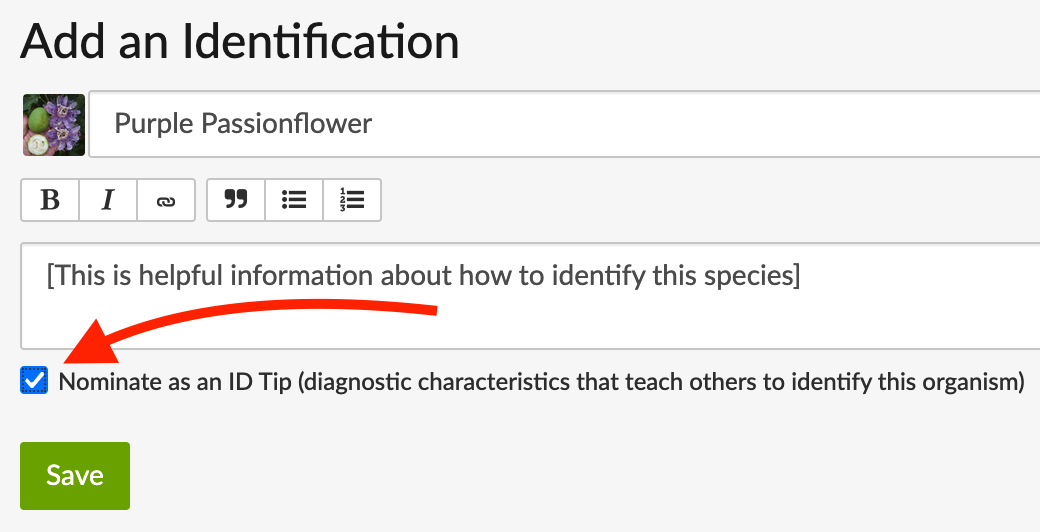
- Click Save — it will now appear in the Identifications tab/dashboard on the taxon page and can be voted on once the observation's observation taxon is at species.
What makes a good identification tip, and how can I vote on one?
If your account is 30 days old, you have a confirmed email address, and you have made either 50 verifiable observations or 100 identifications for other users, you can nominate or vote on an identification tip.
The best identification tips tend to be specific, focus on clearly observable traits in a photo, and cite sources. A few things to aim for:
- Focus on documented traits — talk about distinguishing features or characteristics you can see or hear in the observation itself in additional to general descriptions.
- Keep it concise and clear — a couple of sentences that are easy to scan, or a longer explanation broken into short paragraphs or bullets, is often more useful than one long paragraph.
- Make comparisons — tips that explain how to tell one species apart from similar ones can be especially valuable for people learning identifications.
- Write with learners in mind, too — if you're calling out traits that require precise scientific terms, think about ways to quickly define them or link out to glossaries, diagrams, and other supporting resources. iNaturalist is a place to learn.
- Cite sources if possible, especially links to guides, open source papers, and other resources.
Identification tips which have the above attributes would be good candidates for nominations and upvotes.
If you believe a nominated identification tip is incorrect, or not helpful, that would be a good reason to downvote it.
The Identification Tips Tab: A Detailed Look
This is a more in-depth look at the Identification Tips tab. If your account is 30 days old, you have a confirmed email address, and you have made either 50 verifiable observations or 100 identifications for other users, you will get the full view, which is what detailed below. Accounts that do not meet the above requirements will only see and search in the Upvoted identification tips, and will not be able to vote on them.
Here's what you'll see at the top:
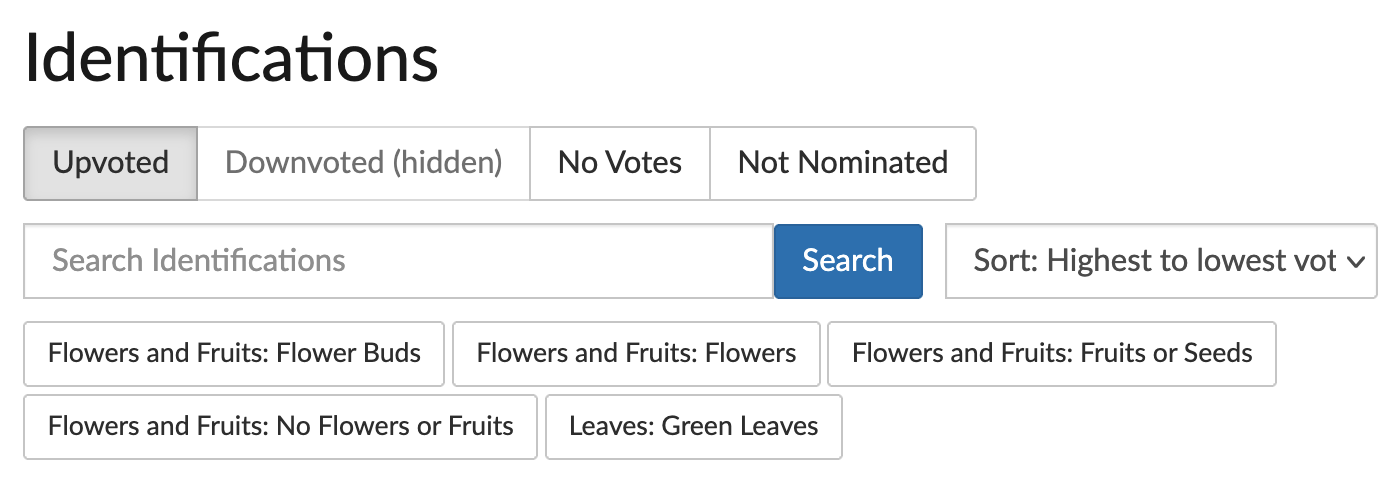
By default, the Identifications Tab is filtered by "Upvoted" identification tips, if any have been nominated and upvoted, and sorted from highest to lowest number of votes. If there are no nominated tips, identification remarks will default to filtering by "Not Nominated", and sorted from newest to oldest.
Filters
- Upvoted: these are identification tips which have more upvotes and than downvotes.
- Downvoted (hidden): these are identification tips which have more downvotes than upvotes.
- No Votes: these are identification tips that have been nominated but have either no votes or have an equal number of upvotes and downvotes.
- Not Nominated: these are identification remarks that have not been nominated as identification tips.
Search
In the search field, you can search for text with in any identification remark that's part of an identification of the current taxon.
Sort
You can sort results using following attributes:
- Highest to lowest votes: the identification tips with highest number of upvotes (minus downvotes) will appear first.
- Lowest to highest votes: the identification tips with lowest number of upvotes (minus downvotes) will appear first.
- Newest to oldest: identification tips or remarks with the most recent posted-on date will appear first.
- Oldest to newest: identification tips or remarks with the most oldest posted-on date will appear first.
- Longest to shortest: identification remarks with the largest number of characters will appear first.
Annotation Filters
Below the search and sort fields, you'll see different annotations and annotation values. Click on one to see only remarks or tips on observations with that value. For example, if you want to see remarks or tips on observations annotated as larva, you can select that here:

Tips and Remarks
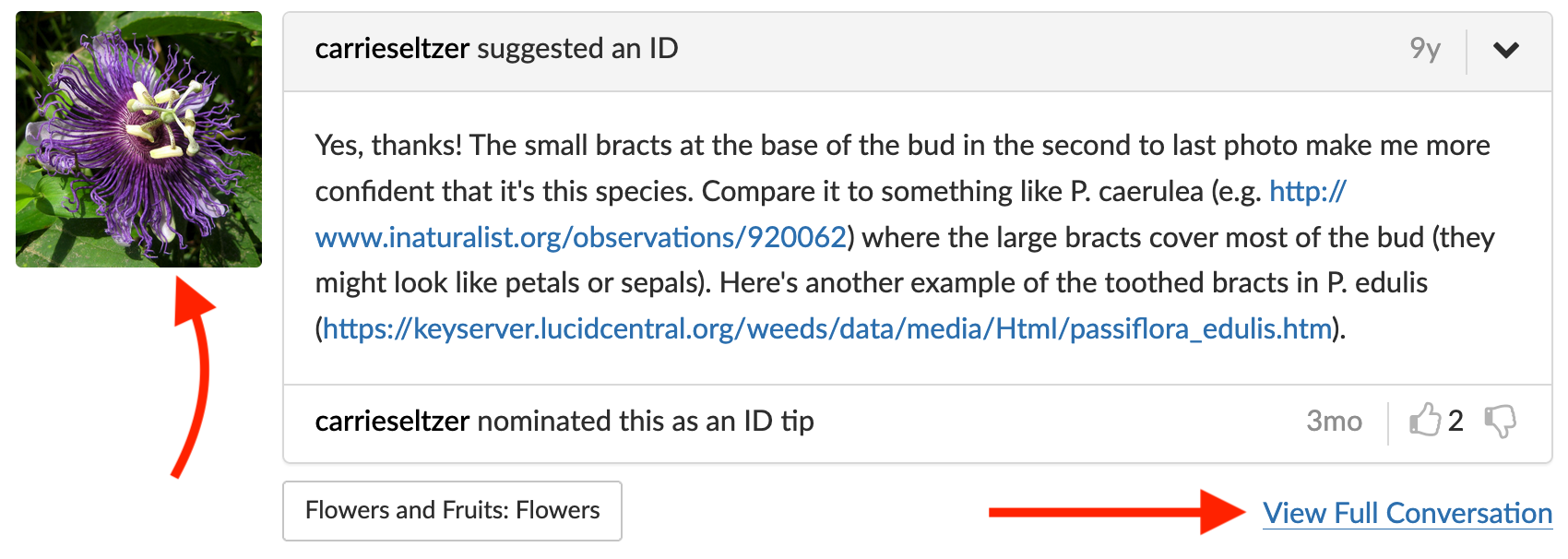
Each remark will display the remark's text, and if it's been nomintated as an identification tip it will have upvote and downvote functionality. To the left is the default photo of the observation where the identification originates, which you can click on. If there are other identification remarks or comments on the observation, you will see "View Full Conversation". Clicking that will take you to the observation so you can see the remark in full context.
Was this article helpful?
That’s Great!
Thank you for your feedback
Sorry! We couldn't be helpful
Thank you for your feedback
Feedback sent
We appreciate your effort and will try to fix the article